All

    Contact Us

    If you still have questions or prefer to get help directly from an agent, please submit a request.
    We'll get back to you as soon as possible.

    Please fill out the contact form below and we will reply as soon as possible.

    • Product
      • Eats365 Products
      • Merchant Guide
      • Modules
      • Membership
      • Integrations
      • Hardware
    • Operations
      • Staff Operations
      • Roles & Permissions
      • Payments
      • Reports
    • News
      • What’s New
      • Release Notes
    • Tools
      • Troubleshooting
      • Simulators
      • Glossary
      • Troubleshooter
      • System Status
    • Login
    Mandarin
    English (US)
    Mandarin
    Cantonese
    • Product
      • Eats365 Products
      • Merchant Guide
      • Modules
      • Membership
      • Integrations
      • Hardware
    • Operations
      • Staff Operations
      • Roles & Permissions
      • Payments
      • Reports
    • News
      • What’s New
      • Release Notes
    • Tools
      • Troubleshooting
      • Simulators
      • Glossary
      • Troubleshooter
    Login
    • Home

    故障排除

    All Product

    Contact Us

    If you still have questions or prefer to get help directly from an agent, please submit a request.
    We’ll get back to you as soon as possible.

    Please fill out the contact form below and we will reply as soon as possible.

        • 疑难解答
        • POS 显示离线
        • 所有设备离线
        • POS 无法连接打印机
        • 打印机无法打印(硬件问题)
        • 将 POS 诊断数据发送至Eats365
        • 下单后未打印二维码
        • 强制删除待处理订单
        • 解决重复打印问题
        • 交易期间钱柜打不开
        • POS 无法连接互联网
        • 优化转桌流程,确保线上订单不会遗漏
      • 模块
          • Android设备上模组的性能问题
          • 解决厨房出菜显示的连线问题
          • 将自助点餐机(安卓)诊断日志发送至 Eats365
          • 将出餐管理系统的诊断日志传送至 Eats365
          • 传送排队机(安卓) 诊断纪录至 Eats365
          • 解决自助点餐机(安卓)上的红色错误指示灯问题
      • 付款方式
          • 刷卡机无法运作
          • 全球支付设备未连接
          • 支付终端与 POS 断开连接
          • 付款读卡器断开连接导致进行小结时出现错误
      • 365支付
          • Adyen 支付终端无法开机
          • Adyen 支付终端电池和充电问题
          • Adyen 支付终端键盘故障
          • Adyen 付款不打印收据
          • Adyen支付终端无法连接网络
          • Adyen 支付终端显示待处理图标
          • 处于服务模式的 Adyen 支付终端

    交易期间钱柜打不开

    了解当您的钱柜遇到问题时如何进行故障排除。

    如果在交易过程中钱柜未按预期打开,请尝试以下故障排除步骤:

    1. 确保帐单/收据和钱柜包含在收据打印机支持的打印项目中。如果最初不包含这两个选项,但您在故障排除过程中添加了它们,请检查钱柜现在是否按预期打开。
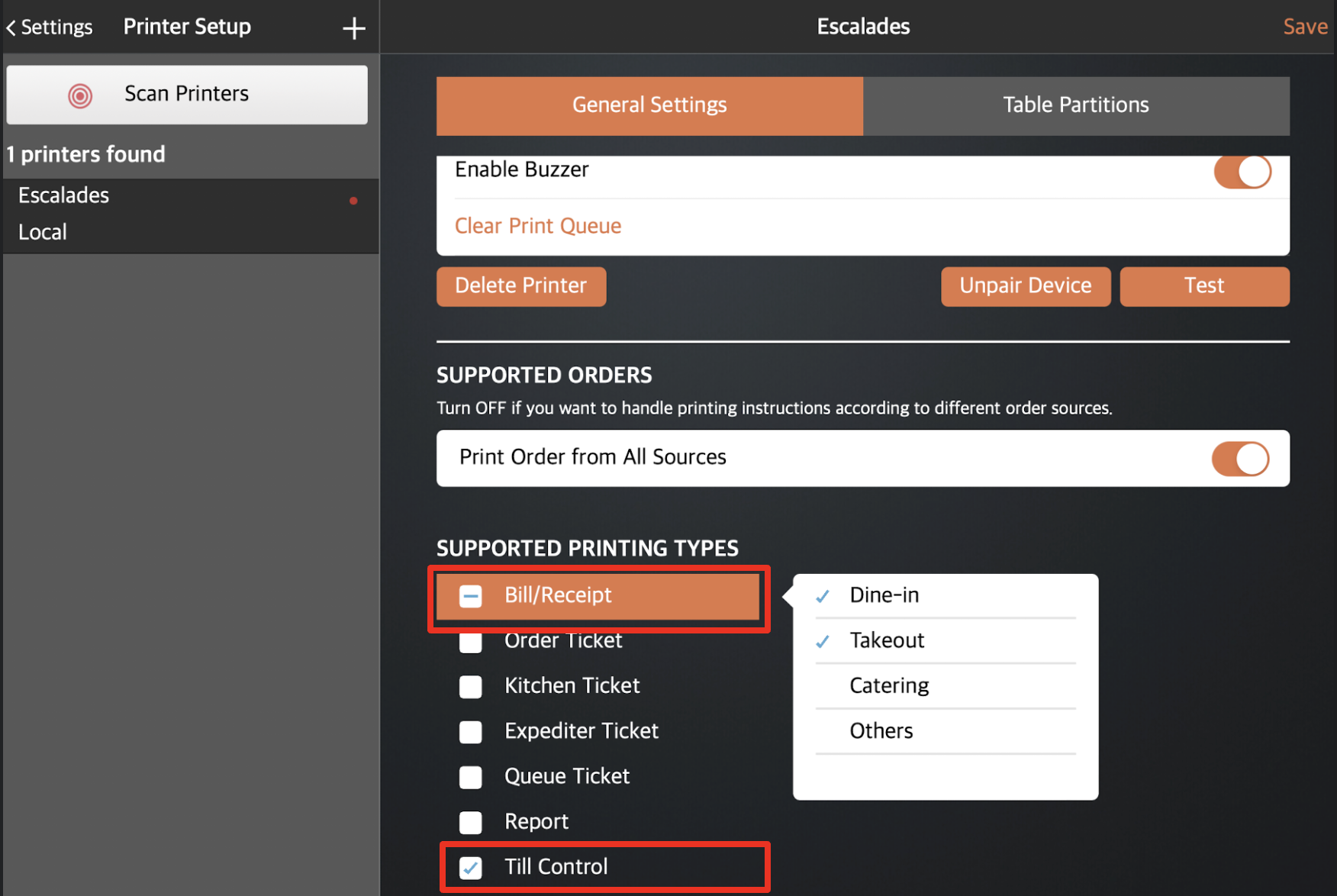
      • 如果仍然无法打开,请从电源插座上拔下电源插头,然后重新插入,以重新启动钱柜。
    2. 确保收据打印机中有纸。如果打印机纸张不足,请更换纸卷并重试。
    3. 确保钱柜没有锁。

    问题未解决

    如果执行上述步骤后,现金抽屉在交易过程中仍然无法打开,请通过 WhatsApp 联系支持团队。

    Was this article helpful?

    Yes
    No
    Give feedback about this article

    Related Articles

    • 配置带有钱柜的收据打印机
              • Products
                • POS
                • mPOS
                • Eats365 Biz
                • Eats365 Marketplace
                • Branded Online Store
                • Kitchen Display System
                • Expedite Display
                • Scan-to-Order (BYOD)
                • Self-Service Kiosk
                • PhotoMenu
                • Queue Kiosk
                • Dynamic Digital Menu
                • Queue Display
                • Pickup Display
                • Customer Facing Display
              • Solutions
                • Online Ordering
                • Contactless Dining
                • Front of House
                • Guest Retention
                • Back of House
                • Back Office (Store End)
                • Multi-brand/Location Management (Enterprise)
                • Paperless Operation Experience
                • Payment
              • Restaurant Types
                • Quick Service Restaurant
                • Full Service Restaurant
                • Bars
                • Food Court
                • Cloud Kitchen
                • Food Retail
                • Self-service Restaurant
                • Enterprise
                • All-You-Can Eat (Buffet)
              • Resources
                • Eats365 Knowledge Base
                • Blog
                • Supported Hardware
              • Company
                • About Us
                • Success Stories
                • Referrals
              • Get In Touch
              • Contact Us
                • Eats365, Inc.
                • Sales info@eats365.com
                • Support support@eats365.com
          • Contact Us
            • Eats365, Inc.
            • info@eats365.com
            • www.eats365pos.com
          • Get In Touch
            • Apple Mobility Partner
              twitter facebook eats365 linkedin
          • eats365
            © 2023 Eats365 Incorporated. All rights reserved.

    Knowledge Base Software powered by Helpjuice

    Expand