 Eats365 Products
 Merchant Guide
 Modules
 Membership
 Integrations
 Hardware
 Staff Operations
 Roles & Permissions
 Payments
 Reports
 What’s New
 Release Notes
 Troubleshooting
 Simulators
 Glossary
 Troubleshooter
 System Status
Eats365 Products
Table of Contents
Eats365 mPOS
Explore mPOS and its functionalities and discover how it can enhance your restaurant's operations.
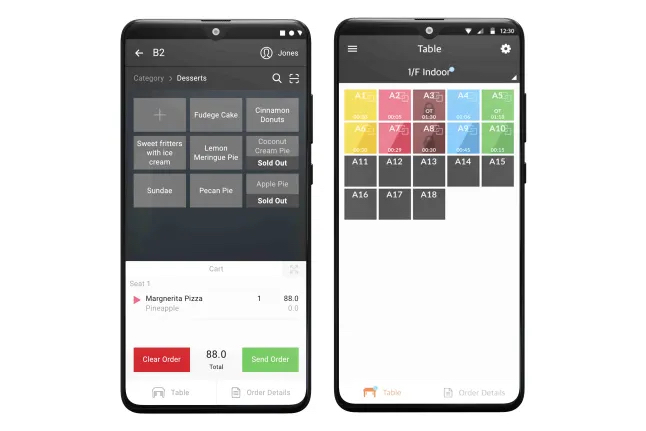
The mPOS is the mobile version of the Eats365 POS which allows restaurant staff to place customers’ orders and process payments table side. It is a handy and convenient tool for quick order processing and helps improve your staff’s table management efficiency.
Feature highlights
Paired with the Eats365 POS
The mPOS is synced with the Eats365 POS so all orders placed on the mPOS are also placed on the Eats365 POS in real-time. This helps reduce time running between tables and the POS, and boosts your restaurant’s overall efficiency.
Modules that work with mPOS: Aside from the Eats365 POS, the mPOS is also synced with the Kitchen Display System and the kitchen printers, so orders placed from the mPOS no longer need to be manually accepted on the POS, and automatically get sent to the kitchen.
Minimum hardware requirements
You don’t need to buy any fancy equipment to start using the mPOS. The mPOS is cost-efficient and can be used on any compatible Android device. To use the mPOS, you only need the following:
- An Android device connected to a stable internet connection
- An mPOS license
- An Eats365 POS terminal
Table management
Just like in the Eats365 POS, but with the added convenience of being handy, wait staff can easily keep track of their tables at all times. The mPOS can show real time status of orders, as well as, check if a table is ready for cleanup. This helps reduce customer wait times and helps increase table turnovers.
Mobile payment
Aside from table-side ordering, the mPOS can also process customers’ payments right at their own tables.
Get started with the mPOS
To get you started with using the mPOS, here are some helpful links for you to explore: