All

    Contact Us

    If you still have questions or prefer to get help directly from an agent, please submit a request.
    We'll get back to you as soon as possible.

    Please fill out the contact form below and we will reply as soon as possible.

    • Product
      • Eats365 Products
      • Merchant Guide
      • Modules
      • Membership
      • Integrations
      • Hardware
    • Operations
      • Staff Operations
      • Roles & Permissions
      • Payments
      • Reports
    • News
      • What’s New
      • Release Notes
    • Tools
      • Troubleshooting
      • Simulators
      • Glossary
      • Troubleshooter
      • System Status
    • Login
    English (US)
    English (US)
    Mandarin
    Cantonese
    • Product
      • Eats365 Products
      • Merchant Guide
      • Modules
      • Membership
      • Integrations
      • Hardware
    • Operations
      • Staff Operations
      • Roles & Permissions
      • Payments
      • Reports
    • News
      • What’s New
      • Release Notes
    • Tools
      • Troubleshooting
      • Simulators
      • Glossary
      • Troubleshooter
    Login
    • Home

    Eats365 Products

    All Product

    Contact Us

    If you still have questions or prefer to get help directly from an agent, please submit a request.
    We’ll get back to you as soon as possible.

    Please fill out the contact form below and we will reply as soon as possible.

        • Eats365 POS
        • Eats365 Biz
        • Eats365 Biz Lite
        • Eats365 mPOS
        • Eats365 Queue Ticket Kiosk
        • Eats365 eSignage
        • Eats365 Customer Facing Display
        • Eats365 Dynamic Digital Menu
        • Eats365 Kitchen Display System
        • Eats365 Expedite Display
        • Eats365 PhotoMenu
        • Eats365 Self Order Kiosk
        • Eats365 Pay Station
        • Eats365 Branded Online Store

    Table of Contents

    Eats365 mPOS

    Explore mPOS and its functionalities and discover how it can enhance your restaurant's operations.
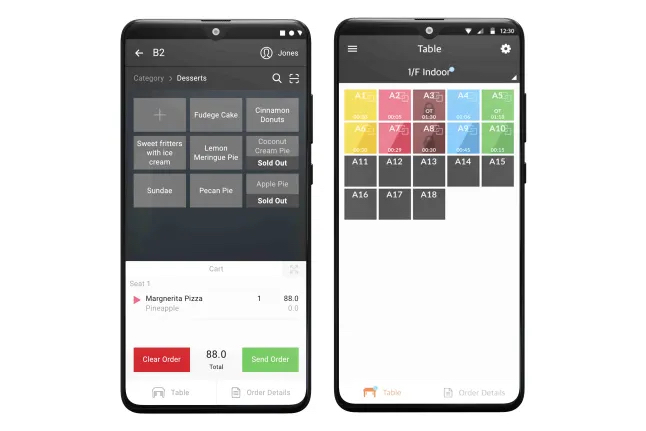

    The mPOS is the mobile version of the Eats365 POS which allows restaurant staff to place customers’ orders and process payments table side. It is a handy and convenient tool for quick order processing and helps improve your staff’s table management efficiency. 

    Feature highlights

    Paired with the Eats365 POS

    The mPOS is synced with the Eats365 POS so all orders placed on the mPOS are also placed on the Eats365 POS in real-time. This helps reduce time running between tables and the POS, and boosts your restaurant’s overall efficiency.

    Modules that work with mPOS: Aside from the Eats365 POS, the mPOS is also synced with the Kitchen Display System and the kitchen printers, so orders placed from the mPOS no longer need to be manually accepted on the POS, and automatically get sent to the kitchen.

    Minimum hardware requirements

    You don’t need to buy any fancy equipment to start using the mPOS. The mPOS is cost-efficient and can be used on any compatible Android device. To use the mPOS, you only need the following: 

    • An Android device connected to a stable internet connection
    • An mPOS license
    • An Eats365 POS terminal

    Table management

    Just like in the Eats365 POS, but with the added convenience of being handy, wait staff can easily keep track of their tables at all times. The mPOS can show real time status of orders, as well as, check if a table is ready for cleanup. This helps reduce customer wait times and helps increase table turnovers.

    Mobile payment

    Aside from table-side ordering, the mPOS can also process customers’ payments right at their own tables. 

    Delete

    Note: The mPOS must be downloaded on a payment device running Android to use the mPOS for mobile payments.

    Get started with the mPOS

    To get you started with using the mPOS, here are some helpful links for you to explore:

    • FAQs on the mPOS
    • Set up and install mPOS
    • Configure mPOS settings
    • Manage orders in the mPOS app
    exploration mpos

    Was this article helpful?

    Yes
    No
    Give feedback about this article

    Related Articles

    • Eats365 PhotoMenu
    • Restaurant service modes
    • Eats365 POS
    • Explore the Eats365 POS interface
              • Products
                • POS
                • mPOS
                • Eats365 Biz
                • Eats365 Marketplace
                • Branded Online Store
                • Kitchen Display System
                • Expedite Display
                • Scan-to-Order (BYOD)
                • Self-Service Kiosk
                • PhotoMenu
                • Queue Kiosk
                • Dynamic Digital Menu
                • Queue Display
                • Pickup Display
                • Customer Facing Display
              • Solutions
                • Online Ordering
                • Contactless Dining
                • Front of House
                • Guest Retention
                • Back of House
                • Back Office (Store End)
                • Multi-brand/Location Management (Enterprise)
                • Paperless Operation Experience
                • Payment
              • Restaurant Types
                • Quick Service Restaurant
                • Full Service Restaurant
                • Bars
                • Food Court
                • Cloud Kitchen
                • Food Retail
                • Self-service Restaurant
                • Enterprise
                • All-You-Can Eat (Buffet)
              • Resources
                • Eats365 Knowledge Base
                • Blog
                • Supported Hardware
              • Company
                • About Us
                • Success Stories
                • Referrals
              • Get In Touch
              • Contact Us
                • Eats365, Inc.
                • Sales info@eats365.com
                • Support support@eats365.com
          • Contact Us
            • Eats365, Inc.
            • info@eats365.com
            • www.eats365pos.com
          • Get In Touch
            • Apple Mobility Partner
              twitter facebook eats365 linkedin
          • eats365
            © 2023 Eats365 Incorporated. All rights reserved.

    Knowledge Base Software powered by Helpjuice

    Expand