 Eats365 Products
 Merchant Guide
 Modules
 Membership
 Integrations
 Hardware
 Staff Operations
 Roles & Permissions
 Payments
 Reports
 What’s New
 Release Notes
 Troubleshooting
 Simulators
 Glossary
 Troubleshooter
 System Status
Eats365 Products
Table of Contents
Eats365 Kitchen Display System
Explore the Kitchen Display System and its functionalities, and discover how it can enhance your restaurant's operations.
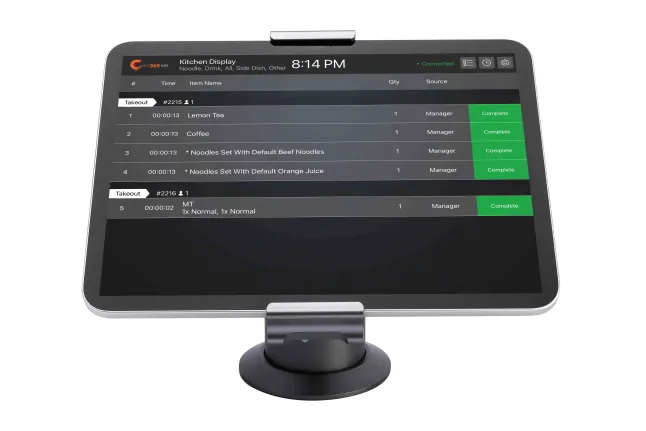
The Kitchen Display System (KDS) is an interactive kitchen management display that allows kitchen staff to efficiently manage and keep track of all orders coming into the kitchen. With the KDS, kitchen staff can monitor orders that get sent to the kitchen in real time, and remove an order from the list as soon as the order is complete.
Feature highlights
Paired with the Eats365 POS
The Kitchen Display System is synced with the Eats365 POS so all orders placed and fired on the POS automatically appear in the KDS in real-time. This helps kitchen staff manage all orders that need to be prepared, and helps them complete the orders in a timely manner.
Modules that work with KDS: Aside from the Eats365 POS, the Kitchen Display System also works with mPOS, PhotoMenu, and Self-Order Kiosk to send customers’ orders to the kitchen.
Offline and online synchronization
The Kitchen Display System is equipped with offline and online syncing functionalities that allow you to continue your restaurant operations even when the network is not available. When your restaurant's internet disconnects, the KDS continues receiving orders from the POS through peer-to-peer connections (local network or Bluetooth) or through cloud syncing (internet).
While it's recommended to use the KDS in online mode for optimum performance, the KDS does not rely on being connected to the internet to function. As long as both the KDS and POS remain connected via peer-to-peer connection, the KDS should continue to operate normally.
One KDS for each Kitchen Station
The Kitchen Display System can be set up to only show items assigned to the Kitchen Station where the KDS is located. When the KDS receives an order, instead of the Kitchen Display showing all items included in the order, the KDS will only show which items are relevant to the Kitchen Station. This saves the kitchen staff’s time in sorting out which items need to be prepared by each kitchen station, and results in orders being served to customers faster.
Customizable view modes
The Kitchen Display System can be customized to sort orders according to what works best for your kitchen’s workflow. You can switch between the following view modes on the KDS:
- Wait time
- Category
- Table
- Chronological order
Timer Alert
The Kitchen Display System has a timer alert feature that notifies kitchen staff when an order has been in the system for too long. When an order hasn’t been prepared or completed after a set amount of time, the order changes its color on the KDS and indicates how many minutes the order has been waiting in the kitchen.
Paperless solution
With the KDS, you no longer need to print kitchen tickets as orders placed on the POS are automatically transmitted to the Kitchen Display System in real-time. The KDS gives restaurants the option to go paperless, which is not only environmentally friendly, but can also reduce costs in the long run.
Get started with the Kitchen Display System
To get you started with using the KDS, here are some helpful links for you to explore: